
Case study: When spreadsheet errors quietly become trusted
Most spreadsheet failures do not happen suddenly.
They become accepted long before they are understood.
Contents
1. Why this case study exists
1.1 Silent risk and obvious failure often coexist
This case study exists because spreadsheet risk is often felt long before it is understood. Sometimes it is also very obvious.
In many organisations, spreadsheets quietly become critical to daily decisions. They start by solving a real problem. Over time, data grows, rules change and more people depend on them. Nothing breaks all at once. Things just start to feel heavier and riskier.
In other cases, the limits are impossible to ignore. Files hit row limits. Calculations take minutes or hours to complete. Opening the spreadsheet becomes an event. To cope, teams split files, disable formulas, paste values, move logic elsewhere or build side tools to keep things running.
Both situations carry risk.
1.2 Why this keeps happening in ordinary teams
When spreadsheet failures do surface publicly, the impact can be severe. Financial loss, data exposure, public embarrassment and long term reputational damage are well documented outcomes. These incidents are rarely caused by reckless people. They happen when ordinary spreadsheets are asked to carry more responsibility than they were designed for.
Most teams sense this before anything goes wrong or long before it becomes public. Files feel fragile. Only one or two people really understand them. Changes feel risky. History no longer feels reliable.
This case study explains how those risks build up and how organisations decide what to do next without assuming that replacement is always the answer.
2. When spreadsheet risk becomes visible
2.1 What happens when errors surface publicly
When spreadsheet failures do become visible, they are often discovered after decisions have already been made and consequences have already followed.
- A single formula error contributed to a multi-billion dollar trading loss at JPMorgan Chase.
- A spreadsheet row limit caused thousands of COVID test results to go unreported in England by Public Health England.
- A hidden spreadsheet tab exposed the names and ranks of thousands of police officers at the Police Service of Northern Ireland.
- A copied formula with a missing reference led to a multi-million dollar operational loss at TransAlta.
- A simple data entry mistake caused a customer to receive a multi-million dollar refund instead of a $100 payment at Crypto.com.
These were not reckless teams or unusual situations.
They were ordinary spreadsheets carrying more responsibility than anyone realised.
2.2 The warning signs most teams see much earlier
For most organisations, risk appears much earlier than this.
The signals are often present long before anything fails publicly. You do not need all of them for risk to be real.
-
Multiple versions of the same spreadsheet are in circulation
-
One person holds the “master” copy
-
Access is controlled by duplicating files
-
Columns or tabs are hidden instead of access being managed
-
Data is copied manually between spreadsheets
-
Other spreadsheets reference this one
-
Decisions are made using summaries built on data that is manually copied, patched, or hard to verify
-
Formulas are avoided because changing them feels risky
-
Checks focus on outputs, not on where the data came from
-
Knowledge of how it works lives in people’s heads
The moment access is controlled by copying files, the spreadsheet is no longer just a tool. It is acting like a system.
2.3 Why this is not just an Excel problem
This pattern is not limited to Excel.
It appears in Excel, Google Sheets, and OpenOffice. The tool changes, but the behaviour stays the same. Informal controls replace clear ownership. Workarounds replace structure. Trust builds socially rather than deliberately.
2.4 When no-code tools move the problem rather than remove it
When teams try to patch these issues, they often turn to no code or low code tools such as Airtable. These can solve some problems quickly. They can also introduce new ones.
- Data volumes hit limits tied to paid tiers.
- Logic is applied at field level and changes history rather than preserving it.
- Permissions feel clear until edge cases appear.
- Some workflows and relationships do not map cleanly to tabular views.
- Vendors become embedded before long term suitability is tested.
The spreadsheet problem moves. It does not always disappear.
What matters is not which product is used.
It is how much responsibility the system is carrying and how quietly that responsibility grew.
3. How spreadsheets quietly become critical
3.1 From helpful file to shared point of truth
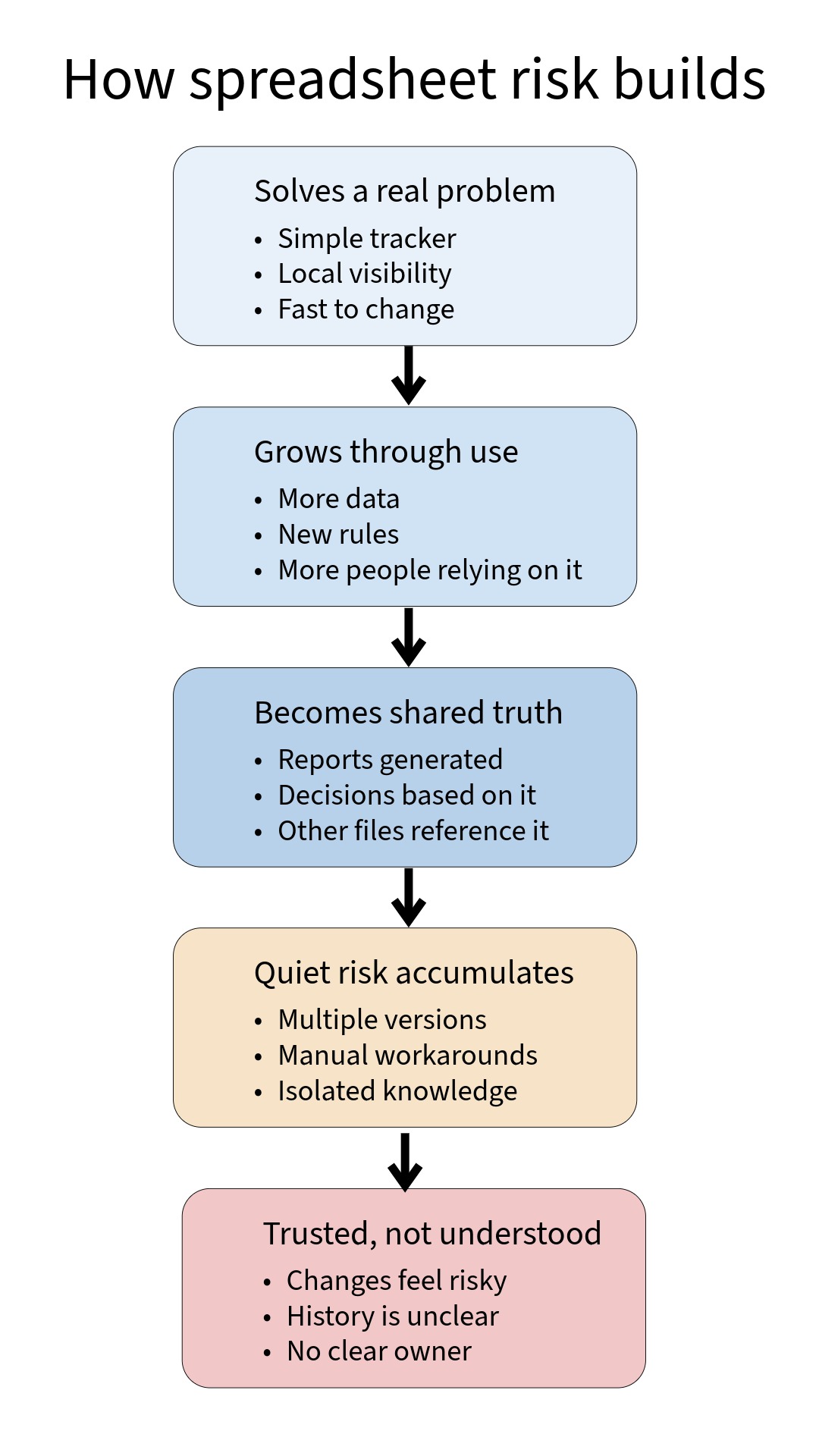
Most spreadsheets do not start as systems.
They begin as a practical response to a real need. Someone needs visibility. Someone needs to track progress. Someone needs numbers that can be changed quickly.
At first, the spreadsheet does exactly what it is meant to do.
Over time, more data is added. New columns appear. Extra rules are built into formulas. The spreadsheet begins to answer questions it was not originally designed to answer.
People start relying on it for decisions.
Reports are generated from it. Other spreadsheets reference it. Assumptions are copied forward. The file becomes a shared point of truth, even if no one formally agreed that it should be.
3.2 The moment no one officially notices
This usually happens without a clear moment of transition.
No one says, “This is now a system.”
No one formally owns it.
No one defines its limits.
3.3 How day-to-day work starts to feel different
As this happens, the experience of working with the spreadsheet starts to change.
The spreadsheet still works. The numbers still look reasonable. Outputs still get produced.
What changes is how it feels.
People become careful about making changes.
Some formulas are no longer touched because no one is fully sure what they affect.
New columns get added instead of fixing old ones.
Manual steps start to appear.
Someone refreshes data by hand.
Someone copies and pastes values to avoid breaking things.
Checks are done outside the file, just to be safe.
Over time, responsibility concentrates in a small number of people.
Often one person becomes the unofficial owner.
If they are away, work slows down or stops.
Versions multiply.
Files are duplicated to reduce risk.
People work on local copies.
Reconciliation sheets appear to explain why numbers do not match.
Nothing feels urgent enough to escalate.
But it starts to feel risky to rely on the spreadsheet and risky to change it.
This is usually the point where teams sense that something is no longer right, even if they cannot yet explain what that is.
At this stage, the spreadsheet is no longer just a tool.
It has quietly become critical.
4. What is actually going wrong underneath
4.1 Hidden logic and silent rule changes
What feels like fragility is usually not caused by one bad formula.
It is caused by logic becoming embedded in places no one can easily see or reason about.
Rules that were once simple get spread across many cells. Assumptions are hard coded into formulas. Decisions that used to be explicit become implicit.
4.2 Why history becomes unreliable
History also becomes unstable.
When formulas change, past results can change with them. A number that looked correct last month may quietly update when logic is altered today. Nothing flags this as a problem. It just happens.
4.3 How risk concentrates in people, not systems
Risk also shifts location.
Instead of being managed by the organisation, risk sits with individuals. People remember which tabs not to touch. They know which steps must be done in the right order. That knowledge is rarely written down.
Workarounds make this worse.
Each workaround solves a local issue. Over time, they add complexity and remove visibility. The spreadsheet becomes harder to explain and harder to trust, even though it still appears to function.
At this point, the issue is no longer about accuracy alone.
It is about whether decisions are being made on something that can still be understood, tested, and defended.
5. Why reviewing alone does not solve this
5.1 Why line-by-line checks miss the real problem
A common response at this stage is to review the spreadsheet more carefully.
That is often necessary. On its own, it is rarely sufficient.
A narrow review focuses on formulas, cells, or tabs in isolation. It assumes the file being reviewed is the one shaping decisions. In many situations, that assumption is already false. Multiple versions exist. Copies are reused. Other spreadsheets reference it. Outputs travel further than the file itself.
5.2 Where AI helps and where it cannot
AI tools introduce a similar risk when used in isolation.
They can explain formulas, highlight inconsistencies, and suggest improvements. They cannot determine which version became trusted. They cannot see how the spreadsheet is used across teams. They cannot identify where authority, ownership, or responsibility actually sits.
5.3 The difference between checking a file and understanding a system
What is needed first is a different kind of review.
A diagnostic that looks at:
-
which spreadsheet is authoritative
-
how it is used in decisions
-
where data comes from and where it goes
-
which logic matters and which does not
Once that context is clear, reviewing formulas and logic becomes meaningful. Without it, detailed inspection can increase confidence in the wrong thing.
This is the difference between checking a file and understanding a system.
6. Where organisations usually misjudge the situation
6.1 Why urgency pushes teams toward tools too early
This is often the point where concern turns into urgency.
The spreadsheet feels risky. People are nervous about relying on it. Senior staff ask whether it should be replaced.
The most common response is to jump straight to a solution.
A new tool is suggested.
A system rebuild is discussed.
Automation or AI is raised as a way to remove human error.
These ideas are not wrong. They are just premature.
At this stage, teams often do not yet understand what the spreadsheet is actually doing. Which decisions it supports. Which rules matter. Which parts are fragile and which are simply messy.
6.2 How rebuilding moves problems instead of resolving them
Replacing something that is not fully understood usually moves the same problems into a new place. Sometimes it makes them harder to see.
The mistake here is not choosing the wrong tool.
It is skipping the step where the problem is clearly defined.
7. The real decision landscape
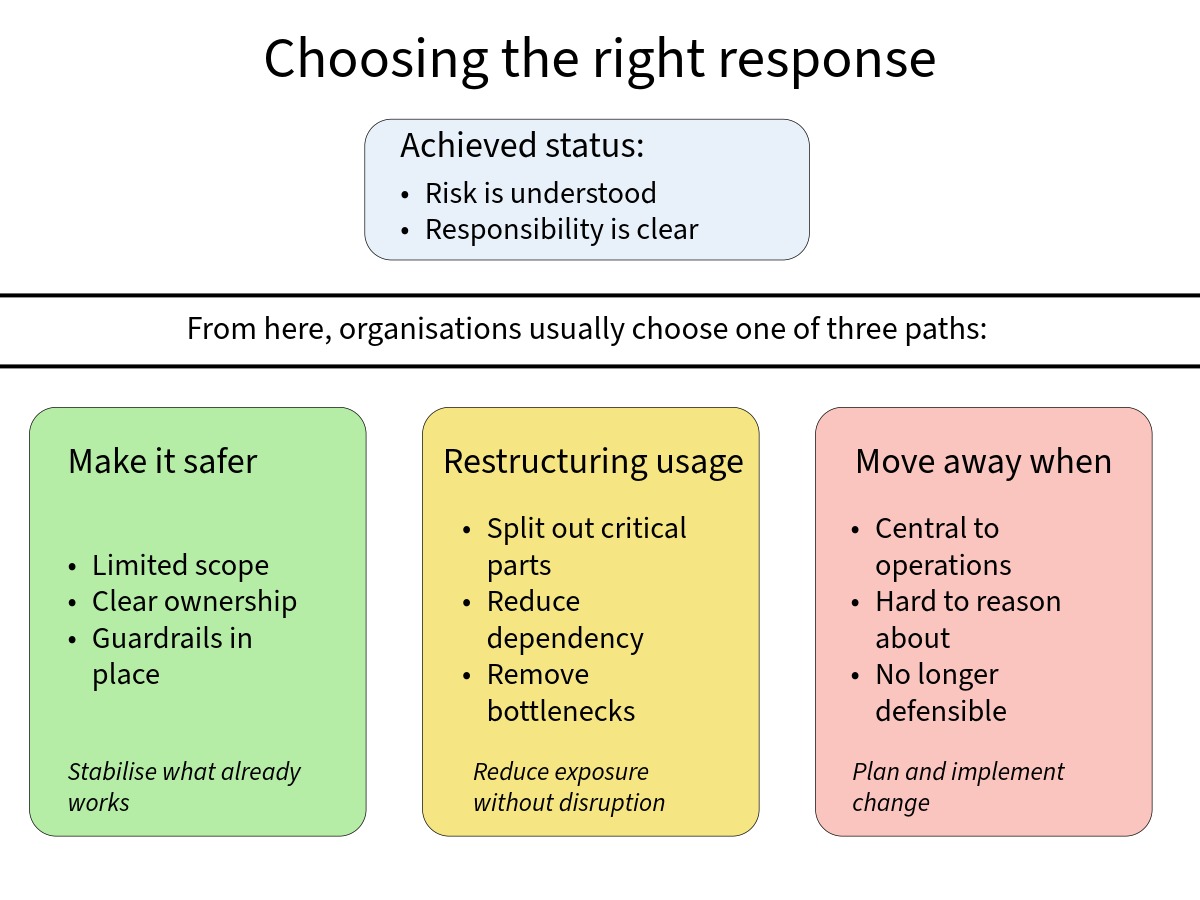
7.1 The three realistic paths forward
Once the situation is properly understood, the choices usually become clearer and less dramatic.
In most cases, there are three realistic directions.
The first is to make the spreadsheet safer.
This can work when scope is limited, ownership is clear, and the risks are understood. The goal here is not elegance. It is stability.
The second is to contain the spreadsheet.
This means putting boundaries around what it does, reducing how much depends on it, and buying time while keeping risk visible. The spreadsheet still exists, but it no longer carries everything.
The third is to move away from it.
This becomes necessary when the spreadsheet is central to operations, hard to reason about, or no longer defensible if something goes wrong. At this point, the focus should be on understanding the decisions first, not rushing into a build.
None of these options is automatically better than the others.
The risk comes from choosing without knowing which situation you are actually in.
7.2 A representative internal example
The following example shows how this plays out in practice.
A small organisation relied on a spreadsheet that had grown over several years. What began as a tracker had become central to how work moved through the team. It held key data, status information, and informal rules about what happened next.
Over time, issues started to surface.
Data was duplicated across sheets.
Manual updates became routine.
Small changes risked breaking other parts of the file.
The initial assumption was straightforward.
The spreadsheet had outgrown its purpose and needed to be replaced.
Before any tool was chosen, the focus shifted to understanding what the spreadsheet was actually doing.
The team mapped where data was created, which decisions depended on it, and where responsibility sat at each step. This surfaced something important.
The spreadsheet itself was not the main source of risk.
The real issues were unclear ownership, manual handoffs, and a lack of visibility when things went wrong. Several parts of the file were messy but harmless. A few small areas carried far more weight than anyone realised.
7.3 What changed and why it worked
Instead of replacing everything, a lighter approach was taken.
A small web based tool was created to hold only the data that truly needed structure and ownership. The spreadsheet was kept where it still added value and reduced where it did not.
No full rebuild.
No extra features.
No automation for its own sake.
The result was not just fewer errors.
It was clearer responsibility and confidence in what to address next.
Most importantly, the organisation understood why the change worked. That made future decisions easier and less reactive.
8. What happens next
8.1 Why a short conversation helps at this stage
At this point, many teams are unsure what to do next.
They sense risk, but they do not know how serious it is.
They feel pressure to act, but they are wary of overreacting.
They are concerned about raising the issue too early or too loudly.
A short conversation helps because it creates clarity without commitment.
8.2 What the conversation is and is not
The purpose of the 15 minute discussion is not to fix anything.
It is not to choose tools.
It is not to commit to change.
It is to work out which situation you are in.
In a short call, it is usually possible to understand:
-
whether the spreadsheet is still safe enough
-
whether risk needs to be contained
-
or whether it is time to plan a move away
Sometimes the right answer is to do nothing for now, but knowingly. That alone can reduce anxiety and prevent rushed decisions.
8.3 Confidentiality and boundaries
These conversations are treated as confidential.
No client names are required.
No files are shared.
No data is copied, stored, or retained.
You can describe the situation at a high level and still get value from the discussion. The focus is on structure, risk, and decision making, not on inspecting your spreadsheet.
Nothing from the conversation is shared publicly.
Nothing is reused in posts, decks, or case studies.
If needed, the discussion can take place under an NDA.
Spreadsheets are not the problem.
They are often the place where deeper issues surface first.
8.4 A calm next step
If any of this feels familiar, a short conversation can help clarify what is actually going on and what, if anything, needs to change.
No obligation.
No sales pitch.
Just a clearer view of your situation.
Whether you are certain or just uneasy, this is the right moment to pause
Some teams know their spreadsheet has reached its limits. Others only sense that something is no longer safe. In both cases, a short conversation can help you decide what matters next.
Let’s make sense of this
Concept Central Ltd
Helping organisations gain clarity on the technology supporting their systems and processes, before deciding what to change and how far to go.
Technology advisory
Process and systems review
Integration and automation
Practical use of AI
Telephone
0777 432 5055
Address
11 – 17 Fowler Road
Hainault Busines Park
Ilford
Essex
IG6 3UJ
You’ve made it this far – why not take the next step? Book a free consultation. No pressure, no commitment. Sometimes one conversation is all it takes.